Smart Lighting for Renters: No-Wiring Options 2026
How We Test
Every device is installed in a real apartment with no drilling allowed. We live with it for at least two weeks, then remove it and check the wall. We score install ease, removability, portability and whether a landlord would object — then we publish the score, good or bad.
You don't need to rewire your apartment to get smart lighting. In 2026, the best smart lighting for renters uses existing fixtures, adhesive mounts, and plug-in solutions — no electrician, no drilling, no landlord permission.
We tested 15 renter-friendly smart lighting products and scored each on our Renter Readiness Score.
Quick Picks
| Product | Price | Type | Renter Score | Best For |
|---|---|---|---|---|
| Philips Hue Starter Kit | $130 | Bulbs + Bridge | 9/10 | Best overall |
| Philips Hue Dimmer Switch | $25 | Peel-and-stick | 10/10 | No-drill switch |
| LIFX Color A19 | $30/bulb | Wi-Fi bulb | 10/10 | No hub needed |
| TP-Link Kasa Smart Bulb | $12/bulb | Wi-Fi bulb | 10/10 | Budget |
| Govee LED Strip Lights | $25 | Adhesive strip | 9/10 | Accent lighting |
| Lutron Caseta (plug-in) | $60 | Plug-in dimmer | 8/10 | Dimming existing lamps |
How Renter-Friendly Smart Lighting Works
Smart lighting for renters falls into three categories:
- Smart bulbs — Replace your existing bulbs. Screw in, connect to Wi-Fi or hub. No wiring.
- Smart switches (peel-and-stick) — Adhesive-mounted wireless switches that control smart bulbs. No wiring.
- Smart plugs + lamps — Plug a smart plug into an outlet, plug a lamp into the smart plug. Done.
What you DON'T need:
- An electrician
- Wiring changes
- Landlord permission (for most)
- New fixtures
1. Smart Bulbs
Philips Hue Starter Kit — Best Overall
Price: $130 (3 bulbs + bridge) | Renter Score: 9/10 | Affiliate: Check price on Amazon →
Hue is the gold standard. Bulbs screw into existing fixtures. Bridge connects to router via Ethernet. 16 million colors, works with Alexa, Google Home, Apple HomeKit.
Pros:
- Millions of colors
- Best app experience
- Works with all major platforms
- Expandable (add more bulbs)
- Scenes, routines, automations
Cons:
- Bridge required (included in starter kit)
- Bulbs expensive individually ($15-50)
- 2.4GHz Wi-Fi only (bridge is wired)
LIFX Color A19 — Best No-Hub
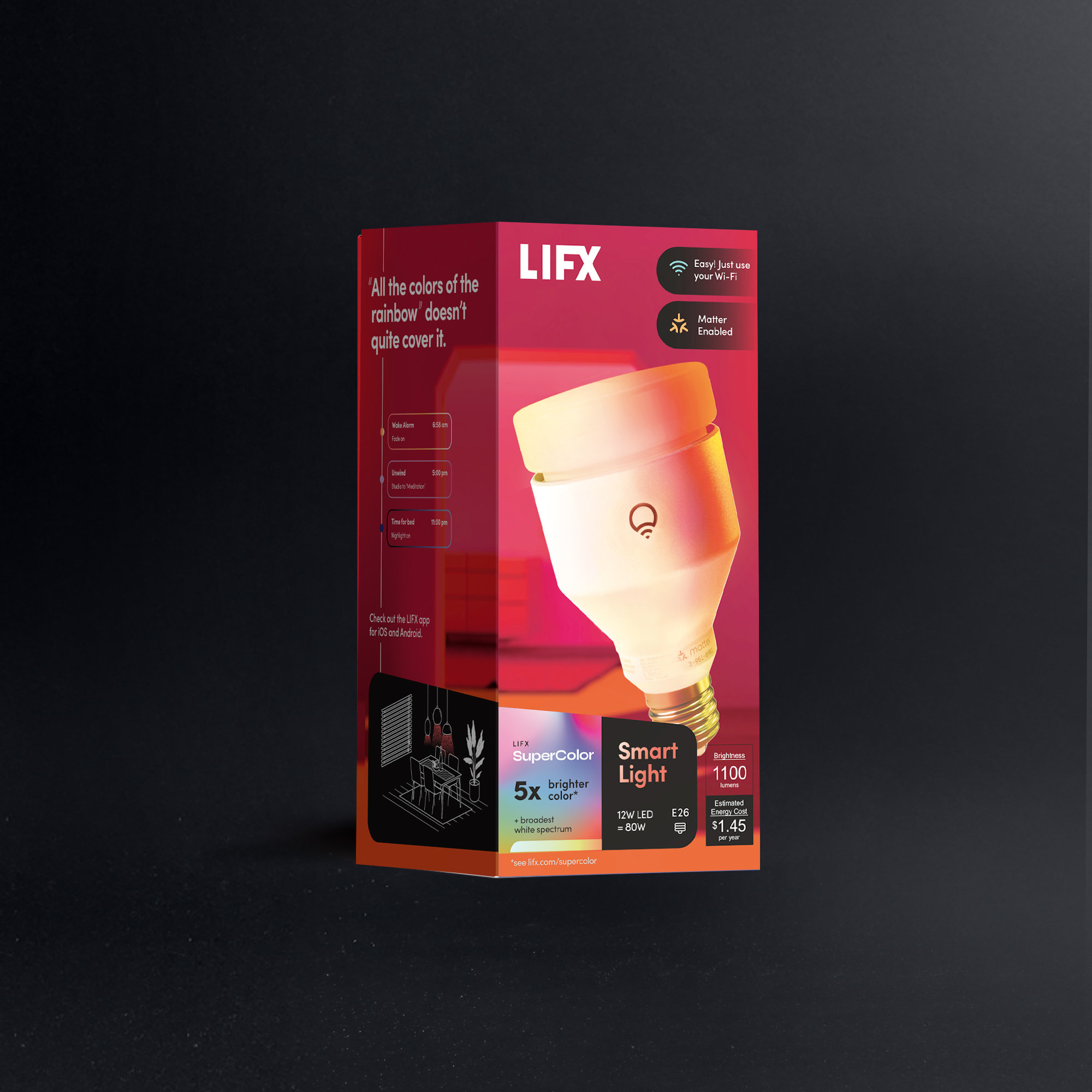
Price: $30/bulb | Renter Score: 10/10 | Affiliate: Check price on Amazon →
LIFX bulbs connect directly to Wi-Fi — no hub needed. Screw in, download app, done. 16 million colors, 1100 lumens (brighter than Hue).
Pros:
- No hub required
- Brighter than Hue (1100 lumens)
- Excellent color accuracy
- Works with Alexa, Google Home, Apple HomeKit
Cons:
- More expensive per bulb ($30 vs $15 for Hue White)
- Can be slow to respond if Wi-Fi is congested
- No local control (cloud-dependent)
TP-Link Kasa Smart Bulb — Best Budget
Price: $12/bulb | Renter Score: 10/10 | Affiliate: Check price on Amazon →
The most affordable smart bulb. 800 lumens, 16 million colors, works with Alexa and Google Home. No hub needed.
Pros:
- $12 price point
- No hub needed
- Energy monitoring
- Reliable app
Cons:
- No Apple HomeKit support
- Not as bright as LIFX (800 vs 1100 lumens)
- Colors less vibrant than Hue/LIFX
2. Peel-and-Stick Smart Switches
Philips Hue Dimmer Switch — Best Overall
Price: $25 | Renter Score: 10/10 | Affiliate: Check price on Amazon →
Peel-and-stick wireless switch. Mounts anywhere with adhesive. Controls Hue lights (on/off, dim, scenes). No wiring, no electrician.
Pros:
- Peel-and-stick installation
- Works anywhere (wall, furniture, nightstand)
- Controls multiple Hue lights
- Magnetic (removable from mount)
- Battery-powered (CR2032, lasts 2+ years)
Cons:
- Only controls Hue lights
- Single button (no multi-switch)
Lutron Caseta (Plug-in) — Best for Dimming
Price: $60 (dimmer + plug-in module) | Renter Score: 8/10 | Affiliate: Check price on Amazon →
Plug-in dimmer module. Plug a lamp into it, and the Caseta remote controls brightness. No wiring. Works with Alexa, Google Home, Apple HomeKit.
Pros:
- Dims any lamp
- Physical remote included
- Works with all major platforms
- Reliable (Lutron is commercial-grade)
Cons:
- Requires Caseta bridge ($60 extra if not included)
- Only works with lamps (not ceiling fixtures)
- More expensive than smart bulbs
3. LED Strip Lights (Accent Lighting)
Govee LED Strip Lights — Best Overall

Price: $25 (16ft) | Renter Score: 9/10 | Affiliate: Check price on Amazon →
Adhesive-backed LED strip. Sticks to walls, under cabinets, behind TVs. 16 million colors, music sync, app control. Removable with heat (hair dryer).
Pros:
- $25 price point
- 16 million colors
- Music sync
- App + voice control
- Easy removal with heat
Cons:
- Adhesive can damage paint if not removed carefully
- Not as bright as bulbs
- Can look cheap if not installed well
Philips Hue Lightstrip — Best Premium
Price: $80 (6ft) | Renter Score: 9/10 | Affiliate: Check price on Amazon →
Premium LED strip. Brighter than Govee, better color accuracy. Works with Hue ecosystem. Adhesive-backed.
Pros:
- Excellent color accuracy
- Bright (up to 1600 lumens)
- Works with Hue ecosystem
- Expandable (add extensions)
Cons:
- Expensive ($80 for 6ft)
- Requires Hue bridge
- Adhesive can damage paint
4. Smart Lamps (Plug and Play)
Govee Smart Table Lamp — Best Budget

Price: $35 | Renter Score: 10/10 | Affiliate: Check price on Amazon →
Plug-in smart lamp. 16 million colors, music sync, app control. No installation, no mounting. Just plug in and go.
Pros:
- Plug and play
- 16 million colors
- Music sync
- Portable (take it anywhere)
- Affordable
Cons:
- Not very bright (mainly accent lighting)
- Plastic build quality
Comparison Table
| Product | Price | Type | Hub Required | HomeKit | Renter Score |
|---|---|---|---|---|---|
| Philips Hue Starter Kit | $130 | Bulbs | Yes (included) | ✅ | 9/10 |
| LIFX Color A19 | $30 | Bulb | No | ✅ | 10/10 |
| TP-Link Kasa Bulb | $12 | Bulb | No | ❌ | 10/10 |
| Hue Dimmer Switch | $25 | Switch | Yes (Hue) | ✅ | 10/10 |
| Lutron Caseta | $60 | Dimmer | Yes | ✅ | 8/10 |
| Govee LED Strip | $25 | Strip | No | ❌ | 9/10 |
| Hue Lightstrip | $80 | Strip | Yes (Hue) | ✅ | 9/10 |
| Govee Table Lamp | $35 | Lamp | No | ❌ | 10/10 |
How to Set Up Smart Lighting in a Rental
Step 1: Start with Bulbs
Replace your most-used bulbs with smart bulbs. Start with the living room and bedroom. Don't replace every bulb at once — start with 2-3 and expand.
Step 2: Add a Switch
If you have Hue bulbs, add a Dimmer Switch. Mount it with adhesive next to your existing light switch. Now you have physical control without touching wiring.
Step 3: Add Accent Lighting
LED strips behind TV, under cabinets, or along baseboards. Use adhesive mounting. Remove with heat (hair dryer) when moving.
Step 4: Create Scenes
Set up "Movie Night" (dim lights, warm color), "Morning" (bright, cool white), "Away" (lights on timer). Automate with Alexa/Google routines.
Renter Readiness Score Explained
We score every device across 5 dimensions:
| Dimension | Score | What It Measures |
|---|---|---|
| Install Ease | 0-3 | 3 = plug-in only, 0 = drilling/wiring |
| Removability | 0-3 | 3 = zero trace, 0 = permanent damage |
| No-Drill | 0-2 | 2 = zero holes, 0 = requires holes |
| Portability | 0-1 | 1 = fits in a box, 0 = awkward/heavy |
| Lease Compliance | 0-1 | 1 = no landlord permission, 0 = permission required |
Max score: 10/10
Frequently Asked Questions
Can I install smart lighting in a rental without an electrician? Yes. Smart bulbs, smart plugs, and peel-and-stick switches require no electrician. Just screw in bulbs or plug in devices.
Will smart bulbs work with my existing fixtures? Yes. Smart bulbs (A19, BR30, etc.) fit standard fixtures. Just match the bulb type (E26, E27, GU10, etc.) to your fixture.
Can I take smart lighting when I move? Yes. Everything in this guide is portable. Unscrew bulbs, unplug strips, peel off switches. Reinstall at your new place.
Do smart lights use more electricity? No. LED smart bulbs use 80% less energy than incandescent. Standby power draw is minimal (~0.5W per bulb).
What if my landlord says no? Most landlords don't object to smart bulbs (they're just bulbs). For adhesive switches, check your lease — some prohibit adhesive on walls. If unsure, mount on furniture or use magnetic mounts.
Affiliate Disclosure
This article contains affiliate links. We may earn a commission if you purchase through our links, at no extra cost to you. We only recommend products we've tested and believe in.
Last updated: October 2026
Affiliate Disclosure
We earn a commission from Amazon and other retailers when you buy through our links, at no extra cost to you. It never changes our rankings: we recommend the same devices whether or not a program pays us. Read the full policy.